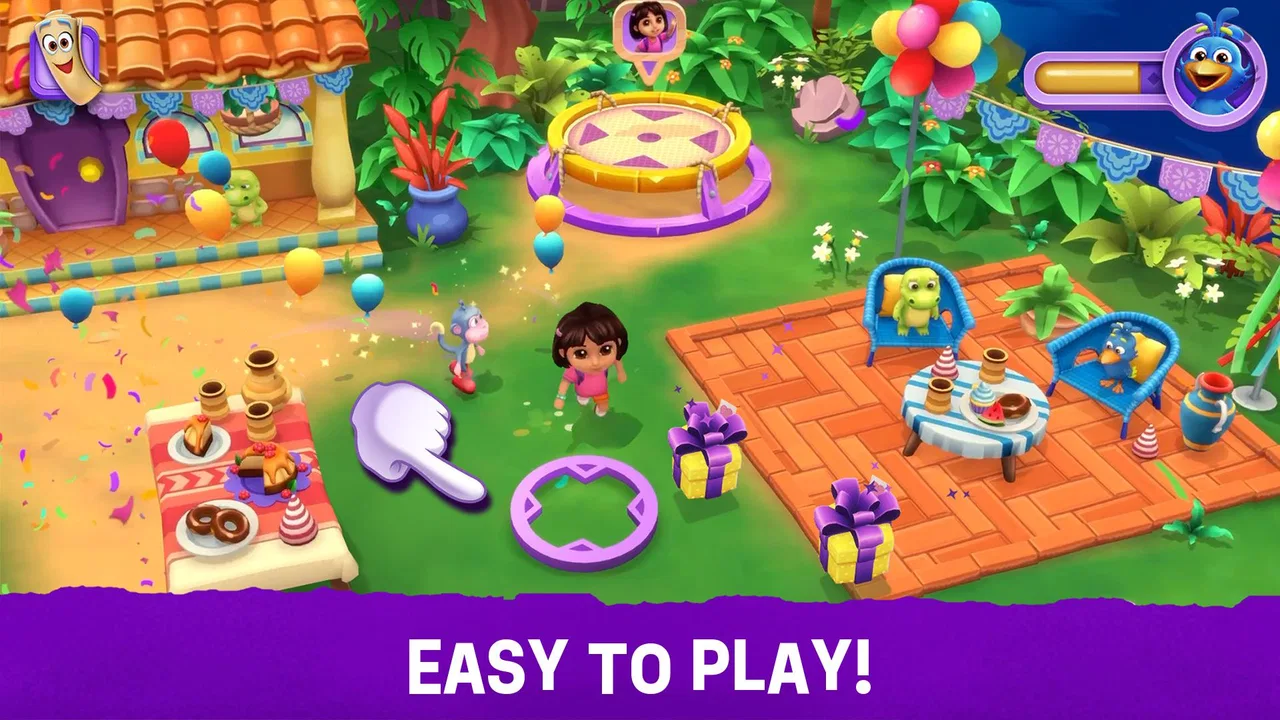
Dora: Explore and Play!
- 4.0
- Rating
- 500.00K
- Installs
- Free
- Price

 Analysis by App-foxy
Dora: Explore and Play! is an educational game built around familiar characters and simple learning activities for young children. I found its main appeal in the way it turns short play sessions into guided moments of exploration rather than asking a child to sit through a formal lesson. It is aimed at boys and girls from three to eight, and that age range matters: a preschooler and an older child may enjoy the same world, but they will not get the same level of challenge from it.
Developed by Budge Studios, the game is free to start and carries an Everyone content rating. Its presentation is clearly designed for family use, with Dora and her friends providing a friendly context for early learning. The Android release requires at least version 5.1 of the operating system, while the current release is 2026.1.3. That makes it accessible on many older devices, although the experience will still depend on how smoothly a particular phone or tablet handles children’s games.
What I like most is that the game does not need to compete with a full classroom lesson. Its best role is smaller and more practical: a few minutes while a parent prepares dinner, a quiet activity during travel, or a gentle way to reinforce skills after preschool. The important question is not whether it replaces teaching. It does not. The better question is whether its goals, feedback, and pacing make those brief sessions worthwhile.
You May Also Like

 Blood Strike: 2.5 Anniversary
Blood Strike’s Loadouts Turn Every Drop Into a Tactical Gamble
A close look at Blood Strike’s custom loadouts: how fast access to signature weapons reshapes its battle royale rhythm, rewards preparation, and narrows the gap between fights.

 Pandora - Music & Podcasts
Pandora’s Music Is Easy to Start, but Harder to Recover
Pandora’s strength is its low-effort path from a seed to a station. Its weak spot is how much confidence it asks you to place in connection, setup, and quiet recovery.

 8 Ball Pool
8 Ball Pool Is Built on Rivalries, Rematches, and Routine
A close look at the rivalries, rematches, shared routines, and unanswered safety questions that turn a quick pool match into a persistent mobile community.

 Samsung Music
Samsung Music’s Quiet Strength Is Playing What You Already Own
Its reach comes less from spectacle than from dependable access to a personal library. That simplicity is both the app’s strongest retention engine and its ceiling.

 AccuWeather: Weather Radar
AccuWeather Review: A Quick, Clear Forecast for Everyday Decisions
For everyday plans, the best forecast is the one you can understand quickly. AccuWeather makes rain timing, radar, and local conditions easy to act on, with a few trade-offs.

 Hill Climb Racing
Why Hill Climb Racing Still Turns Crashes Into One More Run
A tiny car, a bumpy hill and one more upgrade: Hill Climb Racing keeps resurfacing because its simple chaos makes every near-miss feel personal.
More From Our News Desk



How the early goals give children a reason to begin
The first thing a young player needs is an obvious reason to tap, explore, and continue. Dora’s presence helps here because the game starts from a character relationship children already understand. Instead of presenting learning as a worksheet, it frames the activity as joining Dora and her friends. For a child who is still developing confidence with mobile controls, that familiar setting can make the first steps feel less intimidating.
I would describe the early goals as immediate rather than ambitious. A child can focus on what is happening on the screen now instead of worrying about a long-term performance target. That is a good fit for younger players, whose attention often arrives in short bursts. The game benefits when an adult lets the child try independently first, then offers a small hint only when needed. Taking over the device too quickly removes the useful part of the experience: choosing, making a mistake, and trying again.
For families, this also answers an important practical question: does the game require a child to already know how to read? I would not treat it as a reading-first product. The character-led format and visual interaction are more suitable for children who are still learning to follow instructions, recognize patterns, and connect actions with results. An adult may still need to explain an activity at the beginning, especially for a younger preschooler, but that is different from needing to supervise every tap.
One useful routine is to begin with a short, predictable session. I would invite the child to complete one activity, talk about what happened, and then decide whether to continue. This prevents the game from becoming background noise and turns the opening goal into a small learning conversation. Asking “What did Dora ask you to find?” or “Why did that answer work?” adds value that the screen alone cannot provide.
The early structure is also more welcoming than many traditional educational alternatives. A workbook can be precise, but it may feel like work. A general puzzle game can be entertaining, but its learning purpose may be unclear. This title sits between those options. It uses play to lower resistance, while its educational category gives parents a clearer reason to choose it over an unrelated character game.
What progress feels like during a short session
Progress in a children’s game does not need to look like a complex skill tree. For this audience, a useful progress signal can be much smaller: a child recognizes what to do faster, needs fewer reminders, or begins explaining an answer aloud. I paid attention to those moments because they matter more than a flashy reward. If a child can move from guessing randomly to observing the screen carefully, the activity is doing something worthwhile.
The Dora theme helps make progress feel personal. Children are often more willing to repeat an activity when they feel they are helping a character rather than simply completing an exercise. That emotional framing is one of the game’s stronger choices. It can turn repetition from a chore into a familiar ritual, particularly for children who respond well to stories and recognizable faces.
Parents should watch for a difference between progress in the game and progress in everyday learning. Completing an activity successfully may show that a child understands that particular interaction, but it does not automatically prove mastery outside the app. I would use the game as a prompt for follow-up practice: count objects in the room, identify colors during a walk, or ask the child to describe the sequence they just followed. This makes the in-game success more transferable.
Another practical tip is to avoid treating every successful action as a test. Young children can become focused on pleasing an adult, especially when a parent asks repeatedly whether an answer is correct. A better approach is to let the feedback appear naturally and then discuss the reasoning only occasionally. That keeps the game playful while still giving adults a way to notice which concepts need more support.
The game’s popularity gives it some useful context. It has passed 500 thousand installs and holds a 4.0 average rating from around 1.9 thousand ratings. I would read that as evidence of a reasonably broad audience rather than a guarantee that every child will enjoy it. Character familiarity can be a major advantage for one family and completely unimportant to another.
Where the difficulty curve works, and where it may flatten
For a game aimed at such a wide early-childhood range, difficulty is a delicate issue. A three-year-old may need help understanding the objective, while an eight-year-old may expect faster decisions and more independence. The same activity can therefore feel encouraging to one child and too simple to another. I would judge the difficulty by the child’s age and existing confidence, not by the label “educational” alone.
The most suitable player is a beginner who benefits from clear instructions, visual cues, and a forgiving pace. The game is less convincing as a demanding challenge for an older child who already wants complicated rules, deeper problem-solving, or a strong sense of competition. That is not a flaw in its intended design, but it is an important boundary. Parents may mistake a broad age range for a uniform level of challenge, and that can lead to disappointment.
I also would not use it as the only digital activity for an older primary-school child. A more advanced learning app may offer better subject depth, while a carefully chosen puzzle game may provide more satisfying challenge. Dora’s strength is approachability, not intensity. It is at its best when the goal is to make learning feel comfortable and inviting.
The pacing supports that role. Short tasks are easier to fit into a child’s day and less likely to produce frustration than a long lesson with a single final result. At the same time, gentle pacing can feel slow to a child who wants constant novelty. Parents can improve the experience by ending a session while the child is still engaged instead of waiting for boredom or irritation. That small choice makes returning later feel like a continuation rather than a forced restart.
For a child who struggles with mistakes, the forgiving tone is especially valuable. I prefer this kind of environment to an app that makes every error feel like failure. However, a gentle response should still be paired with conversation. If the child simply taps until something works, the game may become a guessing exercise. Encouraging the child to pause and look for clues preserves the educational purpose without turning the session into an interrogation.
Unlocks, repetition, and the pressure to keep playing
Retention in children’s games deserves careful attention. A title can keep a child playing because it is genuinely enjoyable, or because it creates pressure to return and chase the next reward. I found the most healthy way to approach this game is to treat continued play as optional. The child should be able to stop after a satisfying activity, with the parent deciding when another session makes sense.
Character-led progression can make repetition more appealing, but repetition is only useful when the child remains mentally involved. I would look for signs of active participation: the child talks about the task, predicts what may happen, or changes strategy after an error. If the child is tapping rapidly just to reach the next screen, it is time for a break. That observation is more useful than measuring how long the game keeps attention.
There is also a financial consideration. The game is free to download, while in-app purchases are listed at $9.99 per item. That means parents should decide in advance how they want to handle optional spending, particularly if a child uses the device without close supervision. I would not hand over a phone and assume that “free” means there is no purchase decision involved. A parent-managed setup is the sensible approach for a young audience.
This is one area where the game differs from offline alternatives. A coloring book or set of physical cards has no in-app purchase path and can remain available without a battery or screen. On the other hand, the digital format is easier to carry, offers character-based motivation, and can provide immediate feedback. The trade-off is not simply educational quality; it is also convenience, supervision, and how much control a family wants over screen-based rewards.
My advice is to use the game as one item in a rotation. Follow a digital activity with blocks, drawing, conversation, or movement. This prevents the app from becoming the default answer whenever a child is bored. It also reveals whether the game is supporting learning or merely filling time. If a child can connect something from the app to an offline activity, the balance is working.
Everyday situations where it fits best
Imagine a parent needs ten quiet minutes before leaving the house. A child opens the game, completes a familiar activity, and then explains one thing learned while putting on shoes. That is a realistic use case: contained, supervised, and connected to the rest of the morning. I would choose this over allowing an unstructured video stream because the game gives the child something to do rather than asking them only to watch.
It can also work during travel, especially when a child is tired of physical toys. The visual format is more engaging than a spoken lesson, and the Dora setting may help a nervous child settle into an unfamiliar situation. Still, I would not rely on it as the only travel plan. A device can run out of power, and a child who becomes used to constant digital distraction may struggle when the screen is removed. Bringing a book or simple toy keeps the experience flexible.
For shared play, an adult can turn a completed activity into a conversation instead of playing for the child. Ask the child to show the next step, explain a choice, or find a similar example in the real world. This is one of the less obvious strengths of a simple educational game: it gives parents a concrete starting point for interaction. The screen becomes a prompt, not a substitute for the adult.
I would be more cautious about using it in a classroom or group setting. The game is better suited to individual or family play, where the pace can match one child. In a group, some children may wait while others need help, and the character appeal may not be shared equally. A teacher looking for structured assessment would likely prefer a dedicated educational platform with clearer classroom controls.
Who should choose it and who should look elsewhere
I recommend Dora: Explore and Play! to families seeking an approachable first educational game for a young child who enjoys character-based play. It is particularly suitable when the goal is to encourage attention, simple decision-making, and positive feelings about learning. The Everyone rating also makes its intended family audience clear, though parents should still guide screen time and purchases.
I would skip it if you are looking for advanced academic practice, detailed progress reporting, or a highly demanding challenge. It is also not the best choice for a child who has no interest in Dora or who prefers open-ended construction and experimentation. In those cases, a subject-focused learning app, physical activity, or creative sandbox may hold attention more effectively.
The release date is Mar 17, 2026, and the current version is 2026.1.3, so families using the game should keep the app updated through their normal device settings. The developer is Budge Studios, a name closely associated with character-focused children’s entertainment. That background helps explain the game’s accessible presentation, but it does not remove the need for parents to judge whether the learning depth matches their child’s needs.
After spending time with it, my view is that the game succeeds when expectations stay realistic. Its goals are small, its pacing is gentle, and its strongest progress signals appear in a child’s growing confidence rather than in a sophisticated advancement system. The experience is designed to invite play, not to create a demanding curriculum.
My final recommendation is to use it as a short, shared learning activity rather than an all-purpose babysitter. The free entry point makes it easy to try, the Dora theme gives younger players an approachable reason to begin, and the educational framing makes it more purposeful than ordinary character entertainment. Just remember the trade-offs: older children may outgrow the challenge, repetition needs adult guidance to stay meaningful, and the listed in-app purchases deserve parental control.
FAQs for Dora: Explore and Play!
01What is Dora: Explore and Play!?
Dora: Explore and Play! is an interactive children’s app based on the world of Dora the Explorer. It combines simple games, exploration activities, familiar characters, and educational moments designed for young children. During our review, the experience felt colorful and easy to follow, with activities that encourage observation, basic problem-solving, listening, and playful learning rather than demanding fast reflexes.
02Is Dora: Explore and Play! suitable for young children?
The app is mainly aimed at preschool and early-learning children, especially those who already enjoy Dora’s adventures. Its controls are generally simple, and the instructions are presented in a child-friendly way. However, younger children may still need help navigating menus, understanding objectives, or moving between activities. Parents should review the recommended age range on the store page before downloading.
03Does Dora: Explore and Play! require an internet connection?
Some parts of Dora: Explore and Play! may work after the initial installation, but the exact offline availability can depend on the version, device, and downloaded content. An internet connection may be needed for downloading additional resources, updates, advertisements, account-related features, or restoring purchases. We recommend opening the app once while connected to Wi-Fi and checking which activities remain accessible offline.
04Does Dora: Explore and Play! contain ads or in-app purchases?
Parents should check the current Google Play or App Store listing carefully because monetization details can vary by platform and may change after updates. Children’s apps sometimes include optional purchases, subscription features, or advertising controls managed through a parent area. Before handing over the device, review the app’s purchase settings, enable parental restrictions, and confirm whether the available version provides a completely uninterrupted experience.
05Is Dora: Explore and Play! safe and worth downloading for children?
Dora: Explore and Play! can be a good choice for families looking for a familiar, gentle entertainment app with educational touches and simple interactive activities. Its strongest appeal is the recognizable character and accessible design, while its value depends on how much content your child enjoys repeating. Parents should still supervise initial use, check permissions and privacy information, and download it only from an official app store.
Pros
- Fun interactive activities based on the Dora the Explorer series.
- Simple controls make it suitable for preschool children.
- Bright visuals and familiar characters keep kids engaged.
- Encourages exploration through varied mini-games and challenges.
- Child-friendly design with no complex menus or instructions.
Cons
- Some activities may feel repetitive after extended play.
- Appeal is likely limited for children unfamiliar with Dora.
- Progression may be too easy for older preschoolers.
- Requires device storage and may use additional data for updates.
- Parental supervision may still be needed during play sessions.

Dora: Explore and Play!
Gallery